Use this when you have source notes (or want to start making them) and you want a clear signal of which facts about each person are documented. Aligns with the Genealogical Proof Standard’s “complete and accurate citations” pillar without forcing strict GPS compliance. By the end, at least one person will have sourced_* properties wired up, and you’ll see coverage data appear in the Entity Profile View, the Control Center’s Data Quality card, and (optionally) on tree badges.
What you’ll need#
- Charted Roots v0.22.17 or later. The per-fact UI in the Edit Person modal requires this version. Earlier versions only support the YAML-only approach.
- At least one person note. We’ll use William Anderson as the running example.
- At least one source note. We’ll use 1950 US Federal Census as the example. Step 3 covers creation if you don’t have one.
- (Optional) A sense of which of the 10 trackable facts you care about: birth date, birth place, death date, death place, parents, spouse, marriage date, marriage place, occupation, residence.
Steps#
1. Confirm fact tracking is enabled#
Go to Settings → Charted Roots → Research → Research tools → Enable fact-level source tracking. As of v0.22.17 this defaults to on. Verify it isn’t off, then leave it.
If you’re on an older version, the same setting lives under Advanced → Research tools instead. The relocation is the only change in v0.22.17 — the toggle behavior is identical.
2. (Optional) Adjust the coverage threshold#
Same panel: Fact coverage threshold. Default is 6 — sourcing 6 of the 10 facts gives 100% coverage. Lower if you don’t track every fact (e.g., if occupation and residence aren’t your focus). Raise it (up to 10) if you want every fact weighted equally.
3. Create at least one source note#
Skip if you have one already. Right-click a folder → New sources base from template, or use the Create Source modal from Control Center → Sources tab. The minimum frontmatter is:
cr_type: source
cr_id: <unique>
title: <descriptive title>
source_type: <census, vital_record, etc.>
Other fields — source_repository, source_date, confidence — are recommended but optional.
4. Open the person note and edit it#
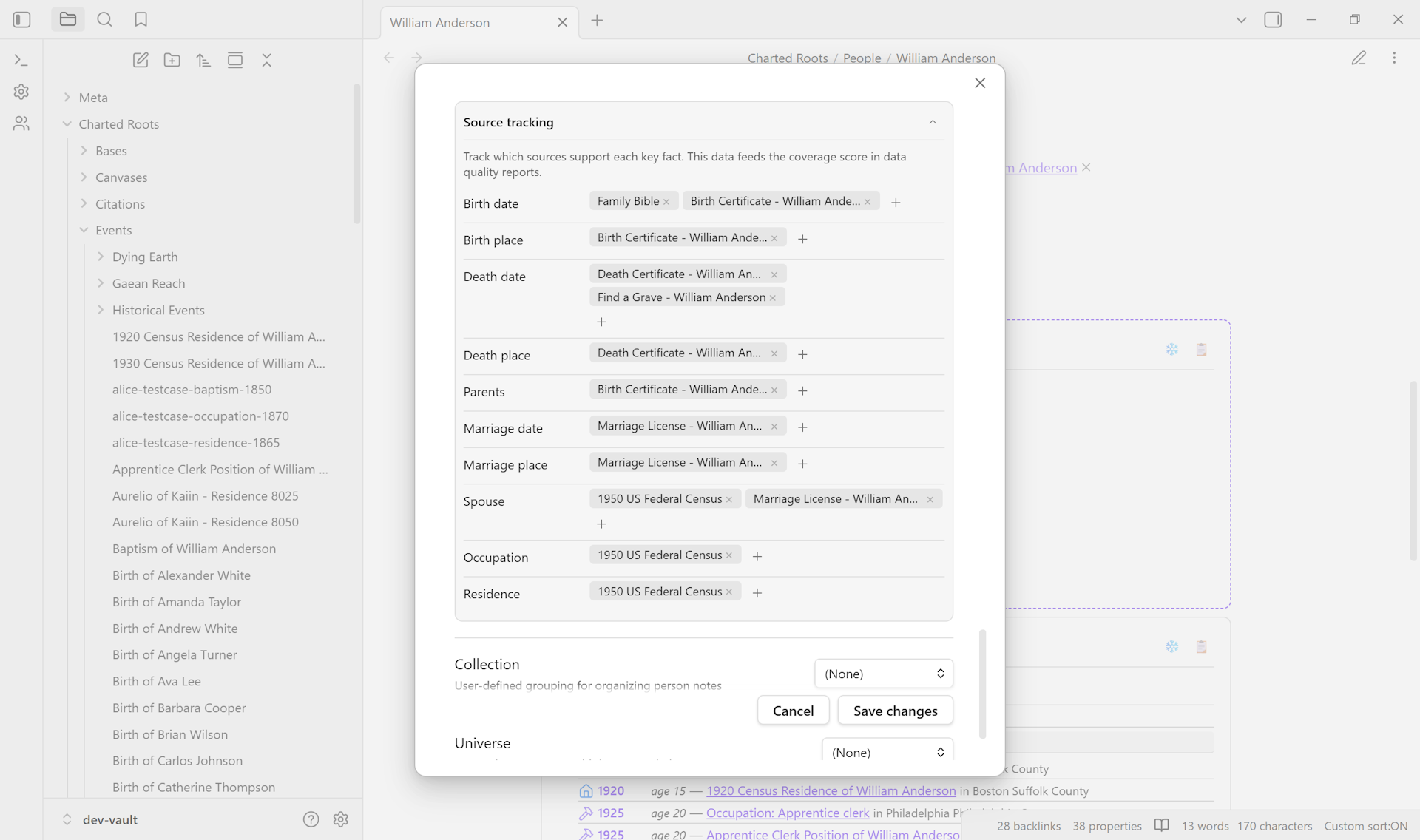
Right-click the note → Edit person. Find the Source tracking section in the modal — it lists all 10 trackable facts as one row each, with + buttons to attach sources.
5. Attach sources to facts#
For each fact you have evidence for, click + and pick the source note from the picker. Multiple sources per fact are encouraged. A birth date confirmed by both the birth certificate and a census is stronger than either alone — that’s the “independent attestation” pattern the Genealogical Proof Standard is built around.
6. Save#
The frontmatter now contains arrays like:
sourced_birth_date:
  - "[[Family Bible]]"
  - "[[Birth Certificate - William Anderson]]"
sourced_birth_place:
  - "[[Birth Certificate - William Anderson]]"
sourced_parents:
  - "[[Birth Certificate - William Anderson]]"
One array per fact you tracked. Note the distinction:
- A missing property means the fact hasn’t been tracked yet.
- An empty array (
sourced_birth_date: []) means the fact is explicitly marked as unsourced.
The empty-array form is useful when you’ve actively looked and confirmed nothing exists — different from “haven’t looked yet.”
7. Verify the coverage shows up#
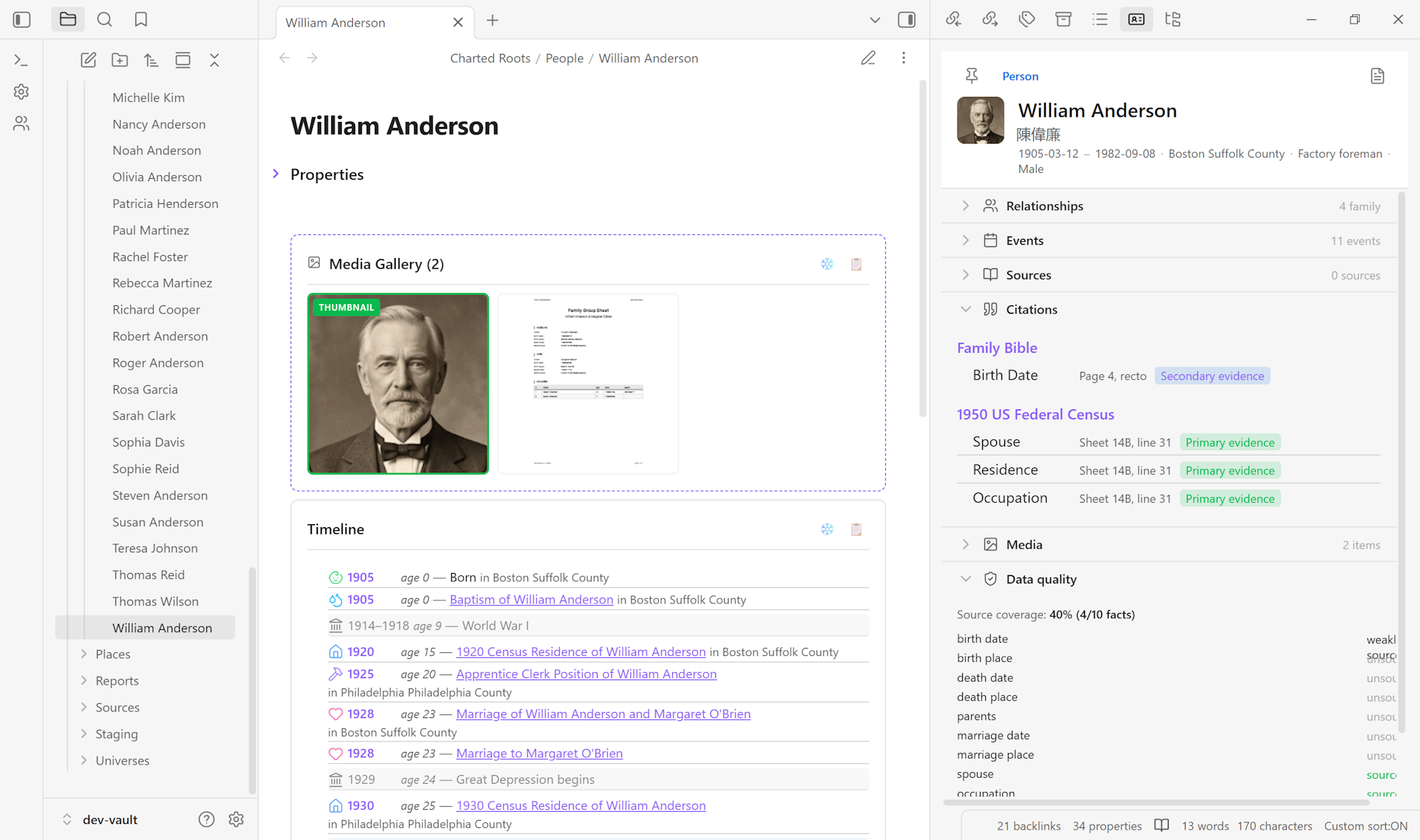
Coverage data appears in three places:
- Entity Profile View for the person — Data Quality section shows the coverage percentage, with primary / secondary evidence badges.
- Control Center → Data Quality card — research-gaps view shows unsourced and weakly sourced facts across the whole vault, grouped by fact type. This is where you go to find your next research target.
- Tree badges (if you’ve enabled them under Canvas styling → Show source indicators) — node badges include the coverage percentage alongside the source count.
Variations#
- YAML-first. Edit frontmatter directly instead of the modal. Same shape — wikilink arrays, one per
sourced_*property. Useful for scripting or for editing in Obsidian’s property panel. - Citation notes for deeper detail. If you need per-fact metadata like page references or quality ratings (0–3 mapping to GEDCOM
QUAY), use citation notes instead. Command palette → Charted Roots: Add citation to current note. Citations andsourced_*arrays sync in both directions:Sync sourced fields from citation notespopulates arrays from existing citations, andGenerate citation notes from sourced fieldsdoes the reverse. - Bulk-populate from a GEDCOM import. If your imported GEDCOM had
SOURblocks withPAGEorQUAYmetadata, citation notes were created automatically. RunCharted Roots: Sync sourced fields from citation notes (all people)to derivesourced_*arrays for every person. - Per-vault disable. Toggle the switch off. Coverage won’t compute and badges won’t display, but
sourced_*data on existing notes is preserved — re-enable later without losing anything.
Related guides#
- I want to capture a source from a website (coming soon)
- I want to attach one source to multiple people (coming soon)
- I want to identify which facts in my tree need more research (coming soon)
Reference#
- Wiki: Evidence & Sources
- Wiki: Settings & Configuration
- Wiki: Frontmatter Reference
Found something wrong or unclear? Suggest an edit — opens a pre-filled issue with the guides label.