Use this when you’re starting a tree from your own knowledge — no GEDCOM file, just notes, memory, or family interviews. By the end you’ll have a person note with the right frontmatter, you’ll know how to add another, and you’ll see the path from a single person to a connected family group.
What you’ll need#
- Charted Roots installed and enabled.
- A folder where person notes will live. The default works; pick a custom one if you prefer.
- One person to start with. Yourself or your oldest known ancestor are both common choices.
Steps#
1. Open the Create Person modal#
Three paths get you there:
- Command palette → Charted Roots: Create person
- Dashboard → Create Person tile
- Right-click a folder in the file explorer → Create person
The folder context-menu path pre-populates the destination folder, which saves a step if you already have a People folder in mind.
2. Fill in the basics#
The form asks for Name (required), plus optional fields for nickname, sex, and birth date. The cr_id is auto-generated — you don’t need to think about it.
When you’re done, choose:
- Create & Open — creates the note and opens it.
- Create & Add Another — creates the note and resets the form for the next person, same folder.
The “Add Another” path is useful when you’re entering a family in sequence.
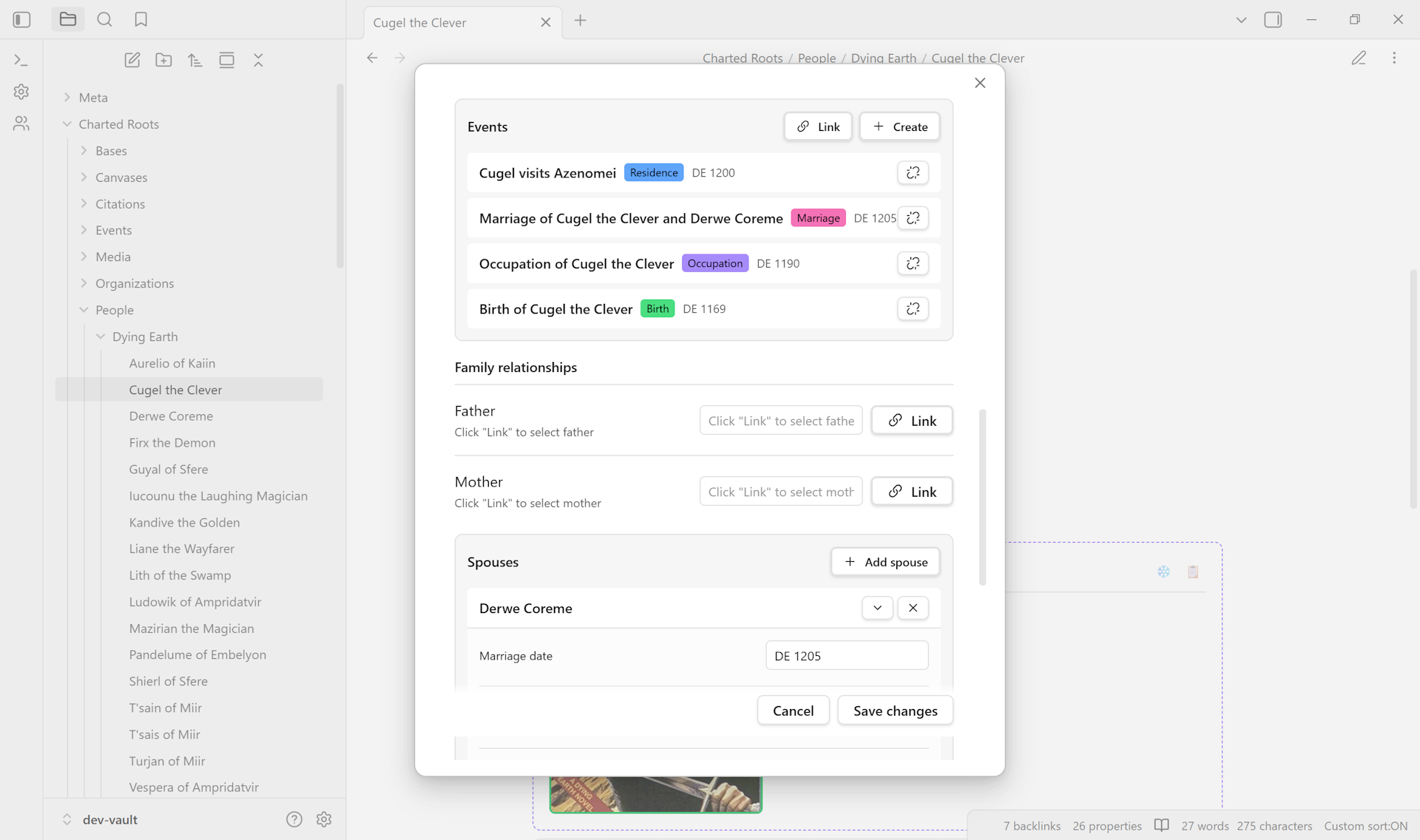
3. Add relationships from the Edit Person modal#
Right-click the new note → Edit. Each relationship field — Father, Mother, Spouse, Children — has two affordances:
- A + button to create a new linked person inline. The new person is linked back to this one automatically.
- An Add existing button to pick someone already in your vault.
You don’t need to also edit the related person’s note to record the link going the other way. The plugin handles bidirectional sync.
4. (Optional) Add events#
The Edit Person modal’s events section records birth, death, marriage, and other life events. Each becomes its own event note linked back to the person. Useful when you have specific dates and places you want to track separately from the basic frontmatter fields.
5. Verify#
Open the note. The frontmatter shows cr_type: person, the auto-generated cr_id, and any other fields you set. The body is yours for biographical research notes.
Variations#
- Building a whole family at once. Use the Family Creation Wizard (
Charted Roots: Create family wizard). It’s a five-step flow for central person + spouses + children + parents, with bidirectional linking baked in. Good when you already know one full nuclear family. - Adding properties to a note that already exists. Right-click the file → Charted Roots → Add essential person properties. The plugin adds
cr_id,cr_type,name, plus common optional fields. Multi-select to apply across many files at once. - Bulk entry across many people. Bases Integration gives you a spreadsheet-like editing surface across all person notes in a folder.
Related guides#
- I want to set up per-fact source citations
- I want to find and merge duplicate persons (coming soon)
- I want to build a family tree for fictional characters (coming soon, worldbuilding track)
Reference#
- Wiki: Data Entry
- Wiki: Getting Started
- Wiki: Frontmatter Reference
Found something wrong or unclear? Suggest an edit — opens a pre-filled issue with the guides label.