Use this when your fictional world has multi-scale geography — a continent map plus regional maps for specific areas, or a city map nested inside a country map. By the end you’ll have a parent → child relationship between two maps, with a clickable marker (and optionally an overlay rectangle) on the parent that drills down to the child, plus a breadcrumb on the child that navigates back.
What you’ll need#
- Two custom maps already created. See I want to create a custom map of my fictional world. The “parent” is the broader map (continent, country); the “child” is the more detailed map (region, city).
- The
map_idof each map (visible in the map note’s frontmatter, or in the Maps tab when hovering a thumbnail).
Steps#
1. Open the child map’s note#
In the file explorer, find the regional/detailed map note and open it. Frontmatter looks something like:
---
cr_type: map
map_id: river-scaum-and-its-major-tributaries
name: River Scaum and its Major Tributaries
universe: dying-earth
---
2. Add the parent map link#
Add parent_map to the frontmatter, using the map_id of the parent:
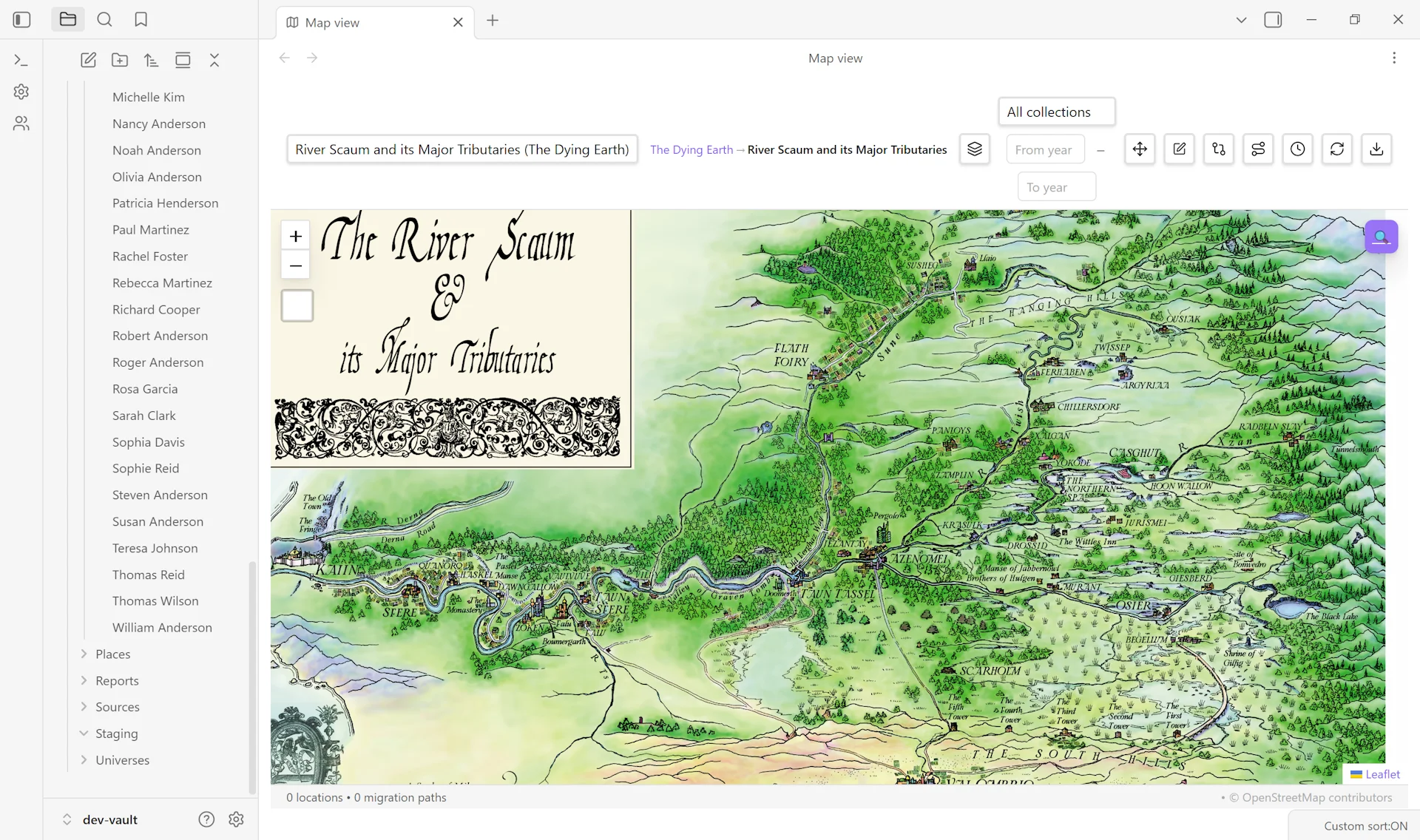
parent_map: the-dying-earthSave the note. That’s enough to enable drilldown — the parent map gains a gold marker for this child, and the child shows a breadcrumb back to the parent in its toolbar.
3. (Optional) Define an overlay region on the parent map#
If you want the child’s footprint visible on the parent map as a clickable rectangle, add region coordinates:
parent_region_x: 4700
parent_region_y: 1300
parent_region_w: 1500
parent_region_h: 1200
The numbers are in the parent map’s coordinate system (pixels for pixel-coord parents, lat/lng for geographic parents). The rectangle renders as a dashed blue overlay on the parent map.
4. (Better) Edit the region directly on the parent map#
The frontmatter approach works but eyeballing pixel coordinates is tedious. The interactive workflow is faster:
- Open the parent map in Map View.
- Click the gold child-map marker → its popup appears.
- Click Edit region (or Draw region if no region exists yet).
- Drag the dashed rectangle to position it; drag corner handles to resize.
- Click Save region in the floating toolbar — coordinates are written to the child map’s frontmatter automatically.
5. (Optional) Add a place-marker drilldown#
If a specific place on the parent map is the natural entry point for the child, add a linked_map property to that place’s frontmatter:
linked_map: river-scaum-and-its-major-tributariesThe place’s marker on the parent map gains an Open River Scaum and its Major Tributaries ↗ button in its popup, alongside the regular Open place button.
6. Verify#
Open the parent map in Map View. You should see:
- A gold map-icon marker for the child map.
- A dashed blue overlay rectangle (if you defined
parent_region_*). - The marker’s popup includes Open map and Edit region buttons.
Open the child map. The toolbar shows a breadcrumb: Parent Map Name → Child Map Name. Clicking the parent’s name navigates back.
Variations#
- Multi-level hierarchy. Chain maps: continent → region → city. Each child sets
parent_mapto its immediate parent. Breadcrumbs render the full chain. - Hide all child markers. Use the Child maps toggle in the Layers menu to hide all gold child markers and overlay rectangles at once. Useful when presenting the parent map without distractions.
- Bidirectional linking. Add
linked_map: <parent-map-id>to a place on the child map pointing back to the parent — gives users a click-through in both directions, not just via the breadcrumb. - Markers without overlay. Skip the
parent_region_*properties entirely. The child map still gets its gold marker (positioned at the parent map’s center as a fallback), so the child is discoverable even without a defined region.
Related guides#
- I want to create a custom map of my fictional world — prerequisite
- I want to align a hand-drawn map to coordinates
- I want to create a fictional universe
Reference#
Found something wrong or unclear? Suggest an edit — opens a pre-filled issue with the guides label.