Use this when you’re populating a fictional universe with characters and their relationships. Maybe you’re building out the noble houses of a fantasy world, the bloodlines of a sci-fi dynasty, or the alternate-history forks of a real lineage. By the end, you’ll have at least one character note linked to your universe, with relationships wired up and (optionally) fictional-calendar dates in place.
The workflow mirrors I want to add my first person from scratch — same Create Person modal, same relationship fields. The worldbuilding-specific bits are the universe field and (optionally) fictional dates in born / died.
What you’ll need#
- A universe note for your world. See I want to create a fictional universe.
- (Optional) A custom calendar registered for that universe, if you want to use fictional dates. See I want to set up a custom calendar with eras.
- A character to start with — typically the central figure of a noble house or family group.
Steps#
1. Open the Create Person modal#
Three paths:
- Command palette → Charted Roots: Create person
- Dashboard → Create Person tile
- Right-click a folder in the file explorer → Create person
The folder context-menu path pre-populates the destination. If you have a universe note open or selected when you trigger the modal, the universe field also pre-populates — saves a step.
2. Fill in the basics, including the universe#
Required: Name. Set the Universe field to the universe you created. Autocomplete suggests universe IDs from your existing universe notes; pick yours.
Optional fields: nickname, sex, birth date.
For dates, use either:
- Real-world dates in
YYYY-MM-DDformat if your fiction uses Gregorian dating. - Fictional dates like
TA 2941(Third Age) orAoL 1234(custom) if you’ve registered a calendar for this universe.
Choose Create & Open to land in the new note, or Create & Add Another to keep the form open for the next character.
3. Add relationships from the Edit Person modal#
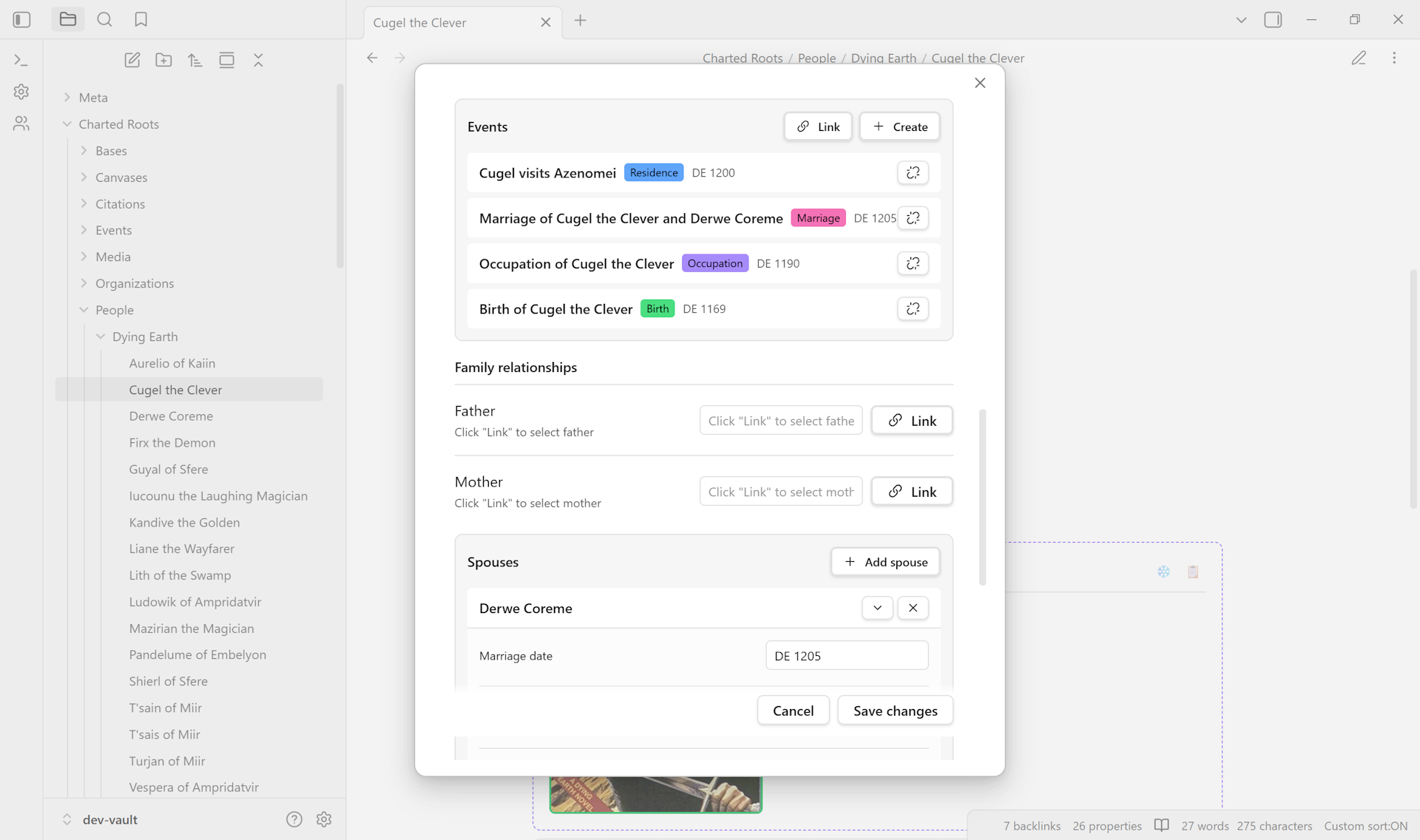
Right-click the new note → Edit. Each relationship field — Father, Mother, Spouse, Children — has a + to create a new linked character inline (auto-bidirectional) or Add existing to pick from your vault. Inline-created characters inherit the same universe.
4. (Optional) Add narrative events#
The events section records births, deaths, marriages, battles, ascensions, exiles — anything from your storyline. Each becomes its own event note linked back to the person, with the same fictional-calendar date support if you set one up.
5. Verify#
Open the note. Frontmatter shows cr_type: person, the auto-generated cr_id, your universe link, and any other fields you set. Open the Universes tab in Control Center — the entity count for your universe ticks up by one, confirming the link is wired.
Variations#
- Building a whole noble house at once. Use the Family Creation Wizard (
Charted Roots: Create family wizard). Five-step flow for central character + spouses + children + parents, with bidirectional linking. Each character inherits the universe of the central figure. - Adding properties to an existing note. Right-click the file → Charted Roots → Add essential person properties. Adds
cr_id,cr_type,name, plus common optional fields. Multi-select to apply across many character notes. - Bulk entry across many characters. Bases Integration gives a spreadsheet-like editing surface — useful when sketching out a noble house’s three-generation roster.
- Organizations and houses. For tracking guild memberships, houses, military units, religious orders, see Organization Notes. Organizations are also universe-scoped and link to characters via membership.
Related guides#
- I want to create a fictional universe — prerequisite
- I want to set up a custom calendar with eras — for non-Gregorian dating
- I want to create a custom map of my fictional world
Reference#
- Wiki: Universe Notes
- Wiki: Data Entry
- Wiki: Fictional Date Systems
- Wiki: Frontmatter Reference
Found something wrong or unclear? Suggest an edit — opens a pre-filled issue with the guides label.